
Back in WWDC 2018, Apple unveiled iOS 12 bringing an array of new features for the iPhones. Amongst other cool features, the Cupertino tech giant added one of the most requested features — Group FaceTime. The iPhone-makers took a different approach to present a group video call by using floating tiles for each participant of the call. Now, when someone in the group call talked, the app automatically zoomed in on his/her tile bringing the person in the spotlight. However, if you’re in a group FaceTime call of say 20 people and 10 people are talking simultaneously, it becomes somewhat annoying to see the tiles shrink and grow continuously. So, now, Apple has come up with a solution to this problem.
Apple has finally started to listen to its consumers and modify iOS according to the actual needs of the users. So, in an attempt to solve the annoying FaceTime zooming feature, the company has now added a toggle to turn off the automatic zooming in FaceTime.
The company recently pushed the iOS 13.5 beta to registered developers. In the beta version, Apple has added this button inside the FaceTime settings page. Let me tell you how you can turn the auto-zoom in FaceTime on/off.
How to Turn On/Off Auto Zoom in FaceTime
- Go to “Settings“.
- Scroll down to “FaceTime“.
- Inside the FaceTime settings, you will find a section named “Automatic Prominence“.
- There is only one option in this segment — “Speaking” and this is the new toggle.
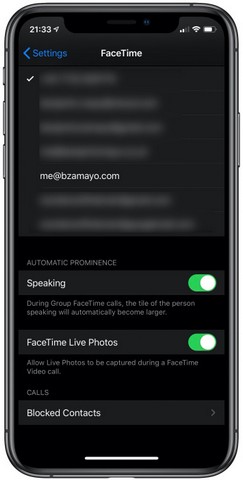
Now, the feature, as of now, lives inside the beta version of iOS and we are not sure if Apple will keep this feature till the public version of iOS 13.5 or not. We saw Apple do this kind of thing previously, with FaceTime itself.
When the company announced the feature, it came with the initial beta version of iOS 12, however, the company then pulled off the feature with the official release of the OS. A few months later, they again brought Group FaceTime with the beta version of iOS 12.1 and this time the feature continued to exist till the public release of iOS 12.1.
So, the addition of the new toggle in the initial beta of iOS 12.5 does not mean that it will come with iOS 13.5 public version. However, even if Apple pulls off this feature, users can be rest assured that the company will eventually add the feature. If not with iOS 13.5, then with iOS 13.5.1.