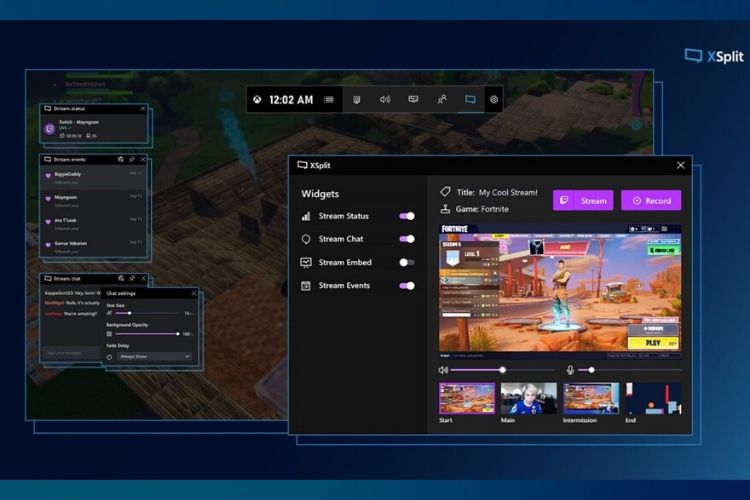
Microsoft is today perking up the functionality of Xbox Game Bar, the in-game overlay baked into Windows 10. Xbox Game Bar is getting its own widget store and it’s exactly what it sounds. You will be able to install third-party plugins that let you access more features from this gaming control center.
The new Xbox Game Bar widget store is going live today but there’s a catch. It won’t be accessible to everyone at the moment. Only Windows 10 Insiders can access the widget store by pressing ‘Win+G’ keys at the same time. If you’re an insider, you will see widgets for XSplit’s Gamecaster (managing your livestream, chats, and more) and Razer’s Cortex are already available for download.
The widget store is standalone and you will be able to access new widgets, update your existing ones, and manage everything related to them from the in-game overlay itself. The idea here is to make all essential features that a gamer needs accessible from the overlay. You don’t need to exit the game to turn on or off a stream, optimize the games, and more.
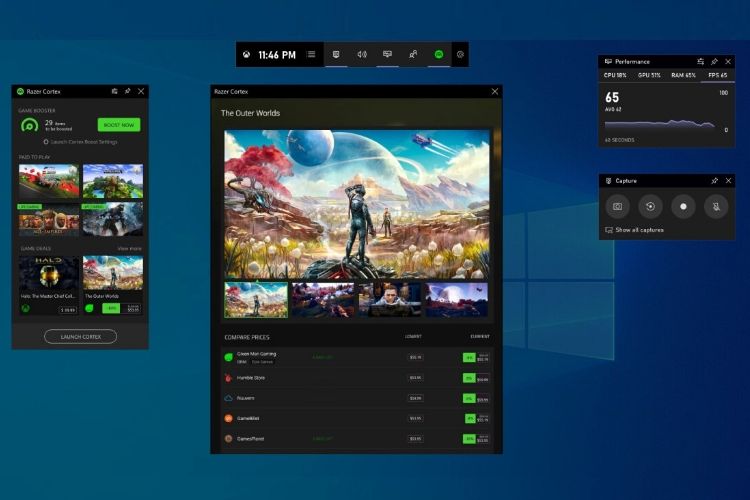
In an official blog post, Eric Hamilton and Kripal Kavi from the Xbox Game Bar Team said, “We heard your feedback loud and clear: you don’t always want to Alt+Tab to separate apps when gaming on your PC. We thought we’d bring your favorite apps to you right within the Xbox Game Bar where you can access them without ever leaving your game.”
Apart from SplitX and Razer, the Redmond giant has found another significant partner in Intel. The American chipmaker will “bring some of the key features available in the Intel Graphics Command Center (IGCC) to the Xbox Game Bar.” Intel’s widget will be available in Spring later this year. It will offer access to display settings, power profiles, and game streaming and capture features
Well, just three partnerships cannot define the widget store. Thus, Microsoft today also released the Game Bar SDK in beta for developers to build widgets for the Xbox Game Bar. You can follow this link if you want to access the SDK and learn how to port features from your Windows 10 app to the in-game overlay.