
Netflix is one of the most popular services people are using to kill time in this quarantine. The service added 15 million new users amidst the Coronavirus lockdown, nearly double its expected projection. The company is showing no sign of stopping and releasing feature after feature to make the experience more enjoyable. Just a few weeks back, it allowed users to lock their Netflix profiles using a PIN code. And now, it has released a long-requested feature of removing items from continue watching list. So, if you want to get rid of your viewing mistake, here is how you can remove continue watching titles on Netflix on Android.
Note: The feature is rolling out in stages. So, keep an eye out if you have not received it yet.
Remove Continue Watching Titles on Netflix on Android
To be clear, Netflix already had a method that allowed users to remove continue watching titles from their accounts. However, that method only worked on the web. If you want to use the same, click on the profile icon the top right and go to Account -> Your Profile -> Viewing activity and click on the ⃠ button.
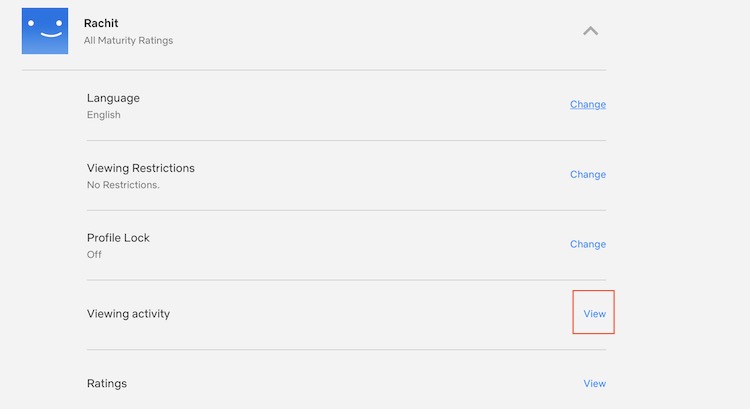
But that method has already existed for a long time so we are not discussing it. Let’s see how you can remove continue watching titles on Netflix on your Android device:
1. Tap the three-dot menu icon on the title you want to remove.
2. Select the “Remove From Row” option.
List of Best Netflix Movies and TV-Series
So, you have been watching everything on Netflix for a month now and you are not sure what to watch anymore. Well, if that’s the case, our lists of best movies and tv-series on Netflix will help you out. Just click on the links below to check them out.
- Best Netflix Movies
- Best Netflix Animated Series
- Best Netflix Animated Movies
- Best Netflix Martial Art Movies
- Best Netflix Originals
- Best Bollywood Hindi Movies on Netflix
- Best Anime on Netflix
- Best Family Movies on Netflix
- Best Heist Movies on Netflix
- Best TV Series on Netflix
Clean Your Continue Watching List on Android
So, that is how you can clean your Continue Watching list on Netflix. As you can see the process is very simple and requires little effort. This Netflix trick will be especially helpful now as you are testing and trying many new titles. Also, don’t forget to check out our collection of Netflix movies and TV-shows. Finally, let us know how you are passing the quarantine by writing in the comments below.