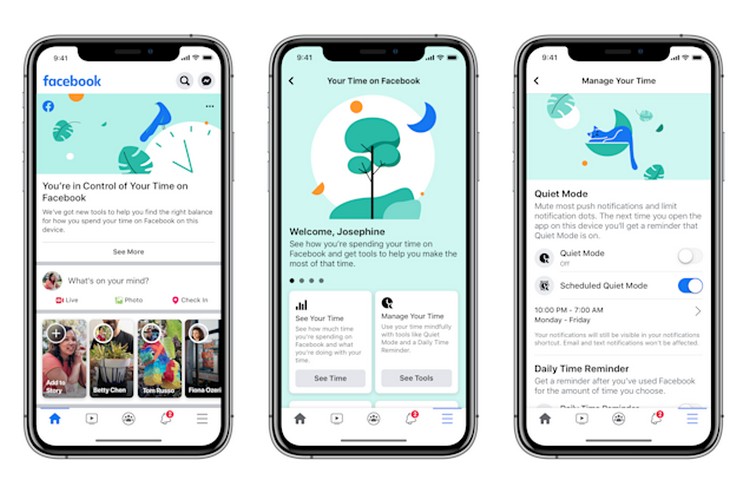
After months of internal testing, Facebook has now started rolling out ‘Quiet mode’ to help users take control over notifications on the social media platform. The feature is now widely available on iOS and for Android, it will hit the public testing phase in May. You can expect to see a wider rollout some time in June.
The announcement was made via the company’s latest Coronavirus update post. “As we all adjust to new routines and staying home, setting boundaries for how you spend your time online can be helpful. Whether it’s to help you focus on your family and friends, sleep without distraction or manage how you spend your time at home, we have tools that can help you find the right balance for how you use Facebook,” wrote Facebook.
Quiet mode lets you mute push notifications and limit notification dots for the app. The company has also added a Scheduled Quiet mode option to let you set a routine for the feature, as hinted by app reverse engineer Jane Manchun Wong last month. You can set Quiet Mode to kick in when you start working (from home) and end as you are about to wrap everything up for the day.
If you try opening Facebook during Quiet Mode, the app will show you a countdown timer along with the option to end quiet mode or temporarily disable the feature for 15 minutes if you simply can’t resist watching cute cat videos again.
The feature can be accessed from Your Time on Facebook under the Settings menu. It was first introduced back in 2018 as an effort to help people manage their time spent scrolling the feed on Facebook.
Apart from Quiet mode, the company is adding shortcuts to Notification Settings and News Feed Preferences which Facebook believes will help you make the most of your time on the platform by “controlling the type of posts you see in your News Feed as well as the updates you receive”.