
Since its launch back in 2009, WhatsApp went on to become the most popular messaging platform globally. With over 2 billion users worldwide, the messaging platform is being used by almost 30% of the world population. Users love WhatsApp because, firstly, it is free and secondly it offers a lot of handy features. Recently, the messaging platform joined the “Dark Mode” club. However, another pretty nifty feature/modification completely went under the radar and that is the “Advanced Search”.
Now, you might be wondering, “Wait, WhatsApp already has a search feature!” and you are not wrong. However, with a recent update, the developers modified that existing feature to make it much more useful. Previously, the search feature only showed the search results for the chat windows. Now, the “advanced search” can give you results for just about anything that you have dealt within the app. The app now shows results for photos, videos, GIFs, documents, links and audio files. So, let me tell you how it works.
How to Use “Advance Search” on WhatsApp
- Open WhatsApp and pull down to reveal the search bar.
- Now tap on the bar to type in your desired search term or sentence.
Note: When you tap the search bar, a drop-down menu will open up to perform the search in a specific category that includes – Photos, GIFs, Links, Videos, Documents and Audio. If you are looking for a specific type of file, then you can use this menu to search for it.
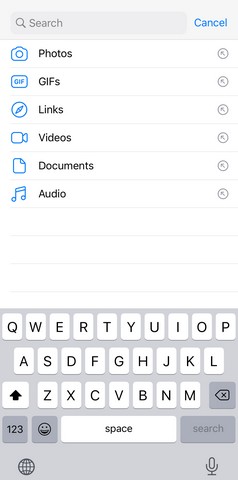
- Now when you type in the words, the app will instantly give you results from every category where it can get related items.
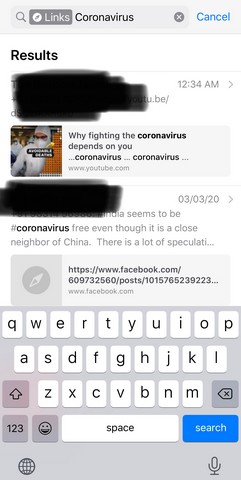
For instance, if you search for say “Coronavirus”, the app will show results not only from the chats but from any category, be it photos or links. If you have sent or received links related to “Coronavirus” within the app, those links will also show up as well as the mention of the word in chats.
Now, this feature is a pretty good modification to the existing search. I think that many users will be benefitted by this change that we barely knew of. Now, this update for the app has been rolled out for both Android and iOS. If you did not get the feature, make sure that your app is up to date. Just download the latest update and you will get it right away.
So, what do you think about this powerful search tool in WhatsApp? Are you gonna be using it? Let us know down in the comments.