
Facebook-owned Instagram is extending its anti-bullying tool to prompt users to refrain from posting hurtful captions on photos and videos. As part of the plan, the social media giant is rolling out the Caption Warning feature globally in a bid to clamp down on abusive and hateful messages on its platform. The move is the latest in a series of actions on cyberbullying by social networks to deal with hate speech and abusive conduct which can be especially harmful to young users.
The feature, which Instagram started testing earlier this year, prompts users to change their message if its algorithm detects potentially bullying remarks, such as ‘you’re stupid’. People typing such messages will immediately be flagged with a notification: “This caption looks similar to others that have been reported”. According to The Telegraph, the user will then be given the option to revise the message or share it anyway.
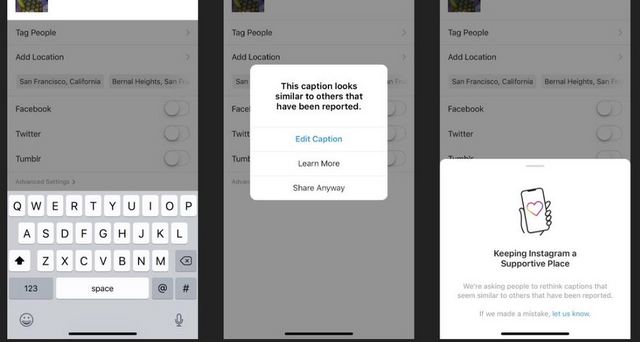
The move has reportedly been welcomed by anti-bullying campaigners around the world. Dan Raisbeck, the co-founder of the UK charity Cybersmile, is one of those who seemed happy with the development, saying: “We should all consider the impact of our words, especially online where comments can be easily misinterpreted”. According to him, “Tools like Instagram’s Comment and Caption Warning are a useful way to encourage that behaviour before something is posted, rather than relying on reactive action to remove a hurtful comment after it’s been seen by others”.
The Caption Warning feature is the latest step from Instagram to stop cyberbullying on its platform after rolling out its ‘Restrict’ feature globally in October. That particular feature, in case you’re unaware, lets users stop people from bullying them by swiping left on a comment, either through the Privacy tab in Settings, or directly on the profile of the account they wish to restrict.