Spotify has been increasing focus on podcasts and it recently took a major step in India. The streaming giant announced a handful of original podcasts, getting regional creators onboard. But, Amazon one-upped Spotify’s podcast endeavors earlier this week with the launch of the Audible Suno app.
Amazon’s Audible introduced its new service aimed at Indian users called “Audible Suno” earlier this week. It offers free access to a lot of entertaining audio content both in English and Hindi without requiring an Audible account. “Audible Suno is a world-first for Audible, and [it] reflects our commitment to creating exceptional entertainment for our Indian customers,” says Audible CEO Don Katz.
Audible Suno currently offers over 60 original and exclusive series from notable stars including A-star celebrities such as Ajay Devgn, Amitabh Bachchan, Anurag Kashyap, Anil Kapoor, Deepika Padukone, Katrina Kaif, Nawazuddin Siddiqui, Ranbir Kapoor, Tabu, Diljit Dosanjh, Farhan Akhtar, Guru Randhawa, Karan Johar to name a few. You can check out the name of some of these podcasts right here:
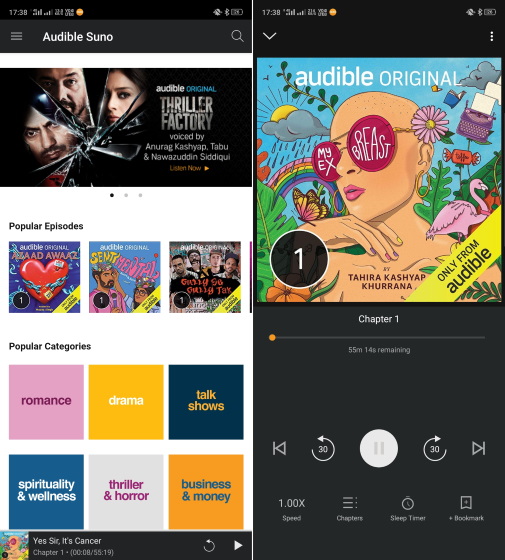
The catalog of Audible Suno is culturally rich and spreads across various genres like drama, horror, romance, suspense, spirituality and wellness, talk shows, interviews, podcasts, and comedy. The app covers socially relevant topics such as mental health, sex education, and the rights of the LGBTQ+ community as well. I’m really excited to listen to “Be Stupid” by Vir Das over the weekend.
All you have to do is install the Audible Suno app for Android (Free) to get started with the service. There’s no subscription or one-time payment to access the content in Audible Suno. For iOS users, the company has incorporated the feature in Audible’s iOS app itself.
The app offers a modern UI and provides fine-tuned options to control the audio playback. You can control the narration speed ranging from 0.5x to 3.5x. The sleep timer in the app lets you set time limits to stop the playback. You can further narrow down the sleep timer by choosing to stop at the end of the chapter or by setting a custom time duration.
There is also a Button-Free mode in the app and it lets you swipe left or right to rewind and forward 30 seconds, tap anywhere to play/pause, and long press to add a bookmark. The button-free mode can be accessed from the top-right corner of the playback screen.
Check out the amazing content on the Audible Suno app and let us know if you found it enjoyable in the comments.