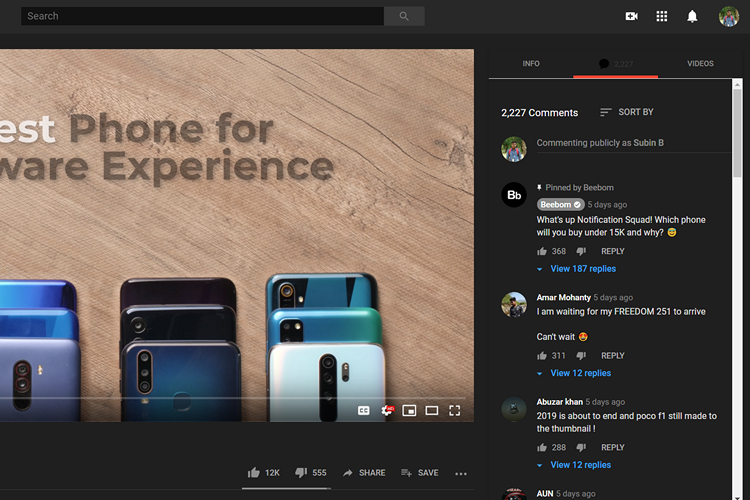
YouTube comments are something most of us check when we are watching a video. However, there is always a slight inconvenience of scrolling down to read the comments and if you’re someone like me who checks comments while the video is being played, you know the struggle of compromising the video’s visuals to check some interesting comments. To get around this problem, there is a Chrome extension named SuperYouTube that conveniently shifts the video description and comments to the right of the video.
SuperYouTube brings three sections namely Info, Comments, and Videos. In the Info tab, you will get the video’s description. You can catch up with the comments while enjoying the video in the Comments tab. The Videos tab accommodates the related videos that usually appear on the right of YouTube’s player.
When you click on SuperYouTube’s icon, you will get the option to specify the default tab that shows whenever you play a video. This way, you will be able to tweak how you want YouTube to look without toggling every time you open a new video.
In addition to this, you can also control the volume just by scrolling over the video. Cool, right? This feature is quite handy in my opinion if you have a mouse attached. It works well with a two-finger swipe from the touchpad as well and if you’re all into gestures, you won’t find any difficulty getting used to this gesture.
I personally enjoy using the extension and I won’t be switching back to the old YouTube without this extension anytime soon. Check out the extension from the link given below and let us know if you found this helpful in the comments.
Download SuperYouTube from Chrome Web Store (Free)