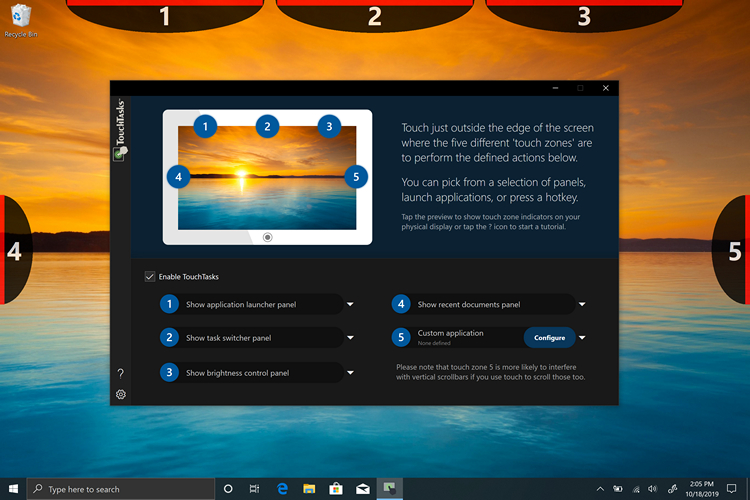
Do you own a touch-supported Windows 10 PC? Well, if you do, you should not miss out on TouchTasks, a productivity app that allows you to define actions that get triggered when you touch on specific locations on the edges of your device’s screen.
You can assign actions to five edges or “zones” of your touch screen. The company has chosen edges to trigger these actions so that “they don’t interfere with other activities” on your screen.
By default, the left middle edge shows a dock where you can add the apps you use the most. The right middle edge of the screen allows you to switch between apps while the top right is assigned to control the brightness levels of your PC. The top-left displays the on-screen keyboard of Windows 10. As I mentioned earlier, you have the ability to set the action you want for each of these edges.
The app has an inbuilt Tutorials session so that you can practice where exactly to touch in order to trigger a particular action. I found this helpful for figuring the exact spots while I tested the app on my 2-in-1 laptop.
It is worth noting that TouchTasks supports both portrait and landscape modes. The app behaves according to the orientation of the device. You can also configure a task display panel to track the progress and access them faster.
TouchTasks is not free and is usually priced at Rs.881. However, the app is currently available to purchase at an introductory price of Rs.440. You can also download a 30-day trial version to check if TouchTasks improves your workflow.
Check out the app from the link below and let us know your experience in the comments.
Download TouchTasks