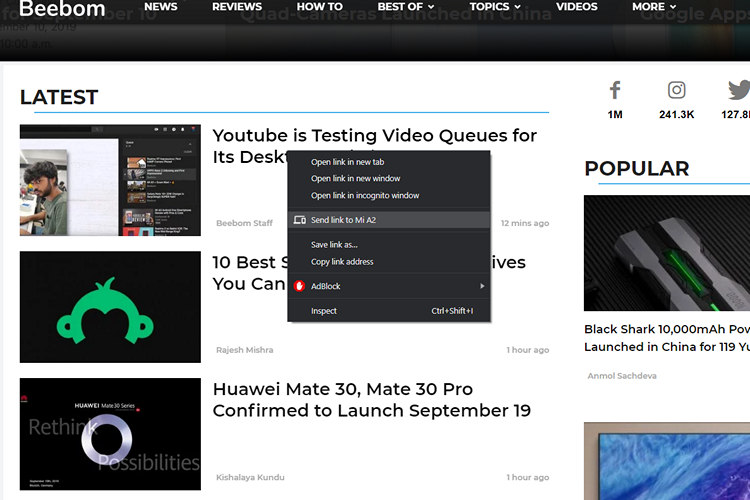
At times when you surf the web, you come across interesting articles or links that you would love to share with your friends and family. To do this, you can go as primitive as mailing yourself the link or open the web version of an instant messaging app like WhatsApp or Telegram and paste the link there. However, both of these methods often turn out to be inconvenient and boring. Well, you can achieve the same end results by enabling a Chrome flag that makes it super easy to send links to any of the devices connected and synced with your Google account.
Enable “Send to Self” Flag in Chrome
1. Open Google Chrome browser and type in chrome://flags in the address bar.
2. Type “Send tab to self” in the search bar of Chrome flags and select Enabled from the drop-down menu or paste the following in the address bar of Chrome.
chrome://flags/#enable-send-tab-to-self
3. Relaunch the browser and you will find a “Send to *device name*” option whenever you right-click a tab or link. Choose the device you like to send the link to if you have logged in your Google Account on multiple devices.
As you can see in the image below, I sent a link from the desktop version of Chrome and that got received as a push notification on my Android phone.
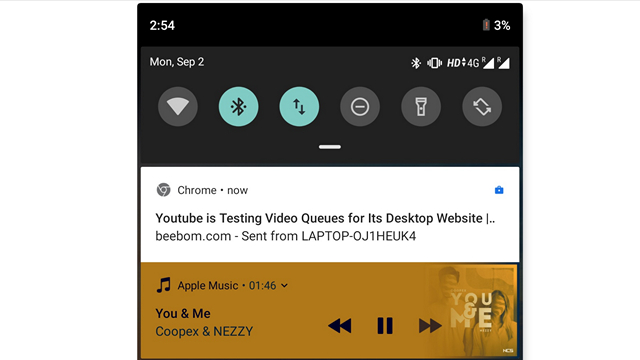
My favorite part of this feature is that the notification shows up almost instantly without any noticeable delay making it a perfect solution to get things done while you’re in a hurry. So, that sums up our short guide on how you can seamlessly share links with yourself. Let us know if you found this helpful in the comments.