
It is no wonder that Google is on a mission to embrace the dark mode as more and more Google apps are getting dark mode support in their latest updates. Chrome recently got the dark theme on all platforms and now, Google is bringing a feature that forces all the webpages out there to turn dark.
Note: The feature is available on the stable version of Chrome in a more basic form under the name “Android web contents dark mode”.
Enable Forced Dark Mode in Google Chrome
1. To get started, download the latest version of Google Chrome Canary. For the uninitiated, Google releases all its experimental features to the Canary version for testing the feasibility and efficiency of the feature. Be warned that the Chrome Canary version might be unstable at times and you may notice a few occasional hiccups.
2. Open Chrome Canary and type chrome://flags in the address bar. In this page, you will find all the available and unavailable Chrome flags ever made by Google. Search for “Force Dark Mode for Web Contents” in the search box available on the page.
3. In doing so, you will see a drop-down menu that says Default. Tap on that and select Enabled. You are also provided with other options like Enabled with simple HSL-based inversion, CIELAB-based inversion, selective image inversion, selective inversion of non-image elements, and selective inversion of everything.
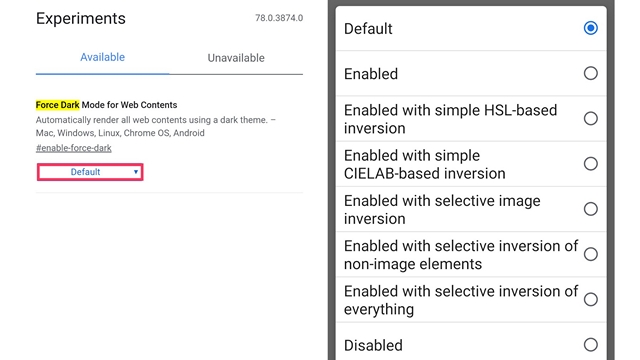
While I tried a few of these, the simple Enabled worked the best for me. Feel free to experiment with these options and choose the one that visually satisfies you. On selecting one of the above-mentioned options, you will be asked to restart the web browser. The selected setting will get applied when you restart your browser.
The best part is that this Chrome flag is not limited to Android. It works just fine with iOS, Mac, and Windows. The steps for enabling forced dark mode are pretty much the same irrespective of the platforms. Below is a screenshot of how our website looks with forced dark mode on a Windows PC.

I just hope Google does not abandon this flag and adds it to other versions of Google Chrome real soon. So, what do you think of Google’s attempt to dark mode everything? Tell us in the comments.