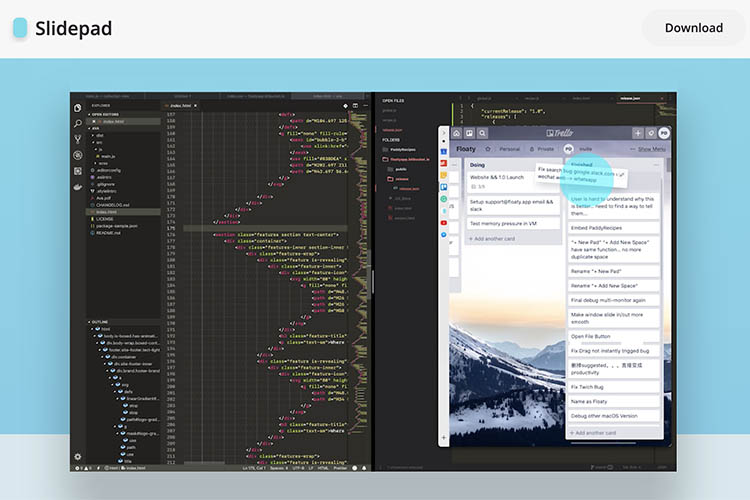
Apple announced iPadOS last month at WWDC 2019, and one of the major improvements Apple has made in the operating system is the slide over mechanism which makes multitasking on the iPad feel even more intuitive than before. While macOS can’t reach that level of intuitiveness due to the lack of touch screens, here is an app that brings an experience that closely resembles it.
Slidepad is a macOS application that allows you to breezily switch between your favorite apps. The app’s sidebar is inspired by popular apps like Franz and Station and has implemented the sidebar concept in their own way. The application brings in a slide over window which can be accessed by hovering the mouse pointer to either left side or right side of the screen. Here’s an example of how the app works on watching a quick YouTube video.

Inside Slidepad, you’re offered with a bunch of useful web apps that are mostly used very often in daily workflow. What’s more, there are no visible limitations to Slidepad since it allows users to add as many web apps they need by typing in the URLs . The possibilities for using Slidepad are endless and depend on what you do with your Mac. Another use-case is demonstrated below where I tried to check Google Calendar for the details of an event that happened last week.
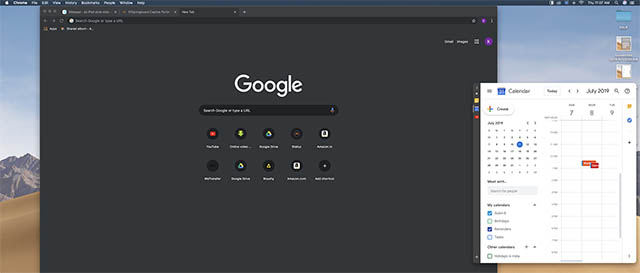
The app also offers features like notification badges, customisable sounds, live notifications, picture in picture mode, drag& drop, global keyboard shortcuts, and even a dark theme if your system is running on macOS 10.14 or above. If you’re not sure of your macOS version and want to update to the latest available software, you may do so with our guide here.
Slidepad offers a 30-day trial during which you can check if it suits your daily workflow and helps to make your experience better. After 30 days, you can keep using the app by making a one-time payment of $9.99.
Download Slidepad