If you’d like to be sure you’re the only one posting elaborately staged yet casual selfies to your Instagram feed, there’s now a powerful new option to help you keep your account safe.
In late September, Instagram announced that it would be adding non SMS-based two-factor authentication to the app. Instagram confirmed to TechCrunch that the company rolled out the security feature last week and that non-SMS two-factor authentication is live now for all users.
Enabling two-factor authentication (2FA) adds an additional “check” to an account so you can be sure you’re the only one who can log in. Instagram previously only offered less secure SMS-based 2FA, which is vulnerable to SIM hijacking attacks but still better than nothing.
Now, the app supports authenticator apps that generate a code or send a user a prompt in order to prove that they are in fact the authorized account holder. When it’s available, enabling 2FA is one of the easiest, most robust basic security precautions anyone can take to protect any kind of account.
If you’d like to enable app-based 2FA now, and you really should, here’s how to do it.
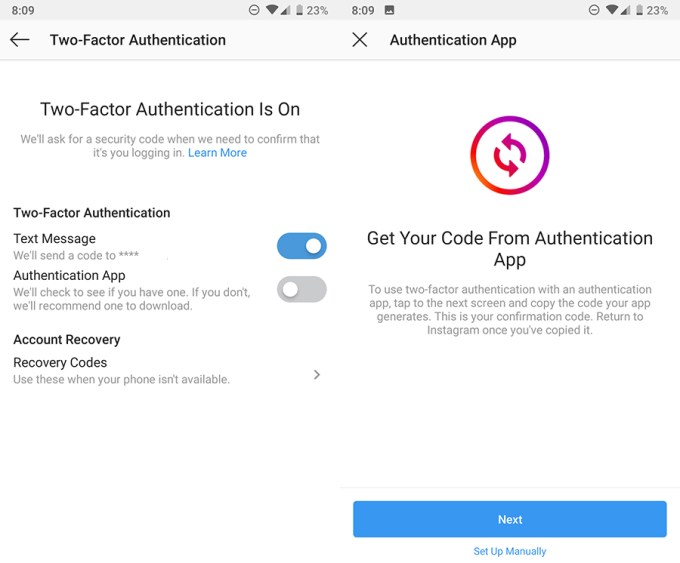
Open Instagram and navigate to the Settings menu. Scroll down into the Privacy and Security section and select Two-Factor Authentication. There, you’ll see two toggle options: Text Message and Authentication App. Choose Authentication App. On the next screen, Instagram will either detect existing authentication apps on your device, invite you to download one (Google Authenticator by default, Authy is a fine option too) or allow you to set up 2FA manually. Follow whichever option works best for you.
You’ll be asked to authenticate the device you’re on now, but you won’t have to do this every time for trusted devices once they have been authenticated. See? Not so bad. It was a long time for such a popular, well-resourced app to leave users unprotected by proper 2FA, but we’re glad it’s here now.
Additional reporting by Sarah Perez.