Got an odd screw, nut, bolt, washer or fastener you need to buy more of, but have no idea to how to find the right one? Amazon’s AR “Part Finder” can help. The company has rolled out a new feature on mobile that lets you point your camera at the item in question, so Amazon can scan it, measure it, then direct you to matching items from its product catalog.
The company didn’t announce the feature’s launch, but confirmed to us it was rolled out to all users a couple of weeks ago.
The feature takes advantage of the iPhone’s camera and its augmented reality capabilities to measure the object in question – a process it walks you through when you first launch “Part Finder” by tapping the Camera button next to the search box in the Amazon app.
This is the area where Amazon has added a number of product-finding functions that let consumers search for products without entering text. For example, here is where you’ll find the barcode scanner, the image recognition-based product search, package X-Ray, Smilecode scanner, AR View, and more.
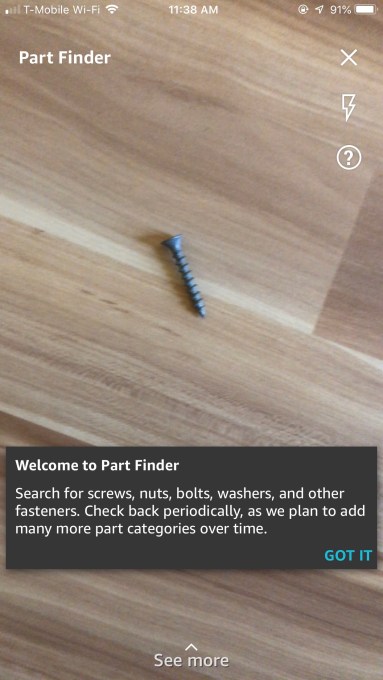
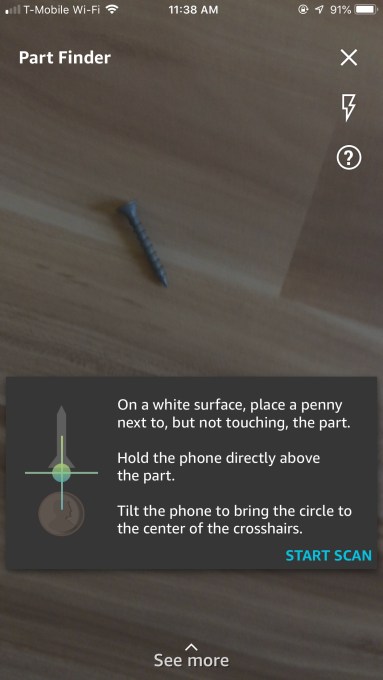
To use Part Finder, you first tap the icon to launch the feature, then place the object on a white surface next to a penny, as instructed. (A piece of white paper worked well.)
The instructions explain how to correctly tilt the phone in order to measure the part. This involves an augmented reality display of a crosshairs and circle that appear on the white surface in the camera’s viewfinder. You tilt the phone until the circle is lined up in the center of the crosshairs.
Amazon’s app then scans the item and delivers results, assuming the product is in focus and you’ve followed the instructions properly.
On the following screen, you add more information to help narrow down the results. For example, we scanned a screw and it asked for other details like whether it was a flat head and the drive type. (Some of this information could have been derived from the scan, one would think, so it’s not clear how much Amazon is relying on the scan itself versus user input here.)
Of course, a screw is an easier thing to find on Amazon. The feature will be a lot more handy when you’re stuck with an odd part that you don’t know how to identify. Unfortunately, we don’t currently have a bunch of unintended parts lying around to test.

Amazon’s Part Finder is one of the more practical examples of AR technology, which can be used to determine the size of real-world objects using a smartphone’s camera. Apple, for example, is introducing a new app in iOS 12 called “Measure” which will let you point your iPhone at things like picture frames, posters and signs, tables, and other objects, to get automatic measurements.
Amazon is not the only retailer using AR to improve the shopping experience. Many other retailers are also taking advantage of the technology – like Wayfair, Houzz and Target are for visualizing furniture in your own room. Topology is using AR to let you virtually try on custom-fit glasses. Target is letting shoppers try on makeup at home in its mobile AR Studio. Ebay’s AR tool helps sellers find the right box for their items. And so on.
The Part Finder feature is currently showing up in Amazon’s app on iOS. No word yet on its Android release.