Following its relaunch earlier this year as a podcast creation platform, Anchor today is bringing its suite of mobile podcasting tools to the iPad. Like its iPhone counterpart, the iPad version of Anchor lets you record, edit, then distribute your podcast anywhere, including iTunes and Google Play Music. The new app is also customized for touch-based editing, and it takes advantage of iPad features like drag-and-drop and multitasking.
The company had originally been focused on short-form audio, but more recently realized it could better serve the growing audience of podcasters with a set of easy-to-use tools available right on their mobile device.
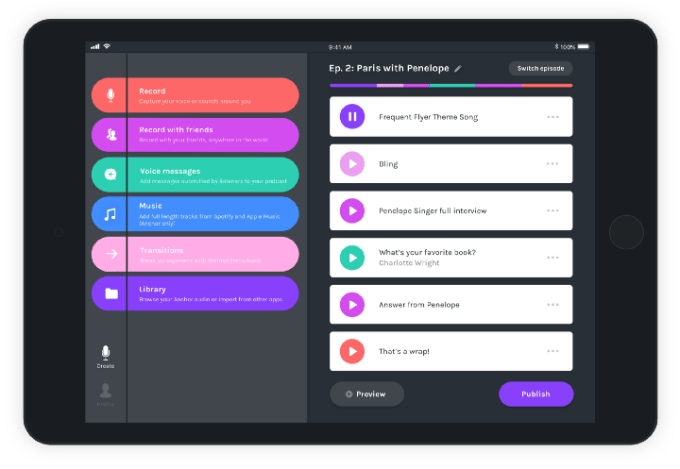
The iPhone version of Anchor lets you press a button to record your audio, record with friends, insert voice messages (like call-ins) into your podcast, and easily add music and transitions. The iPad app now offers a similar set of tools, with a few upgrades and tweaks.
For starters, you can opt use a real microphone by plugging one into your iPad’s lightning port, or by using a lightning-to-USB adapter.
You can also upload or even drag and drop audio files from other apps into Anchor for use in its episode builder. For example, you could pull in music from GarageBand, add a voice memo, or import other audio files saved in a cloud storage site like Dropbox.
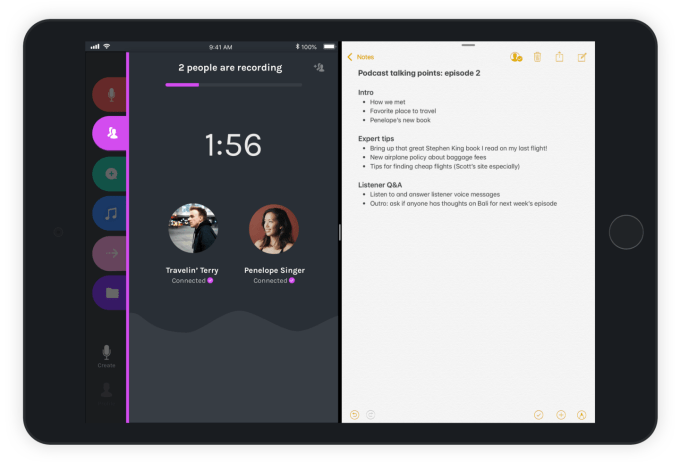
The app support multitasking, too, so you can keep your notes open as your record.
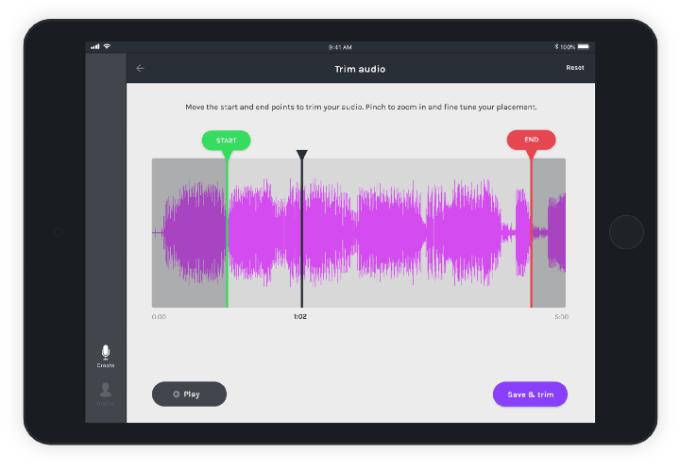
And you can directly edit the audio files on the iPad itself using touch-based controls that are easy enough for anyone – even novice or amateur podcasters – to use.
The controls allow you to trim the beginning and end of your podcast, so you can cut out issues like false starts or other chatter. And you can split audio clips in order to insert transitions, voice messages, music, and other audio.
The clips can then be moved around or deleted as you put your podcast together.
Given the popularity of podcasting today, it’s actually fairly remarkable that no one else had yet introduced audio editing tools built with the needs of podcasters in mind.
The Anchor app is also another example of how the iPad can be used for content creation, not just consumption – and specifically, how it can be used as an editing tool for creative projects.
Anchor for iPad, like the iPhone app, is free to use as the company is currently living off its funding. But the longer-term plan is to offer monetization tools to Anchor’s podcasters, where Anchor itself would likely take a cut of revenues.